Outbound links play a significant role on the open web, but how do you track clicks on outbound links using your website analytics? Here’s a guide on how to automate external link click tracking on your site using Google Analytics and Plausible Analytics. Let’s get started.
- What is an outbound link?
- How do you create outbound links?
- What can I learn from tracking outbound link clicks?
- Can Google Analytics and Google Tag Manager track link clicks?
- What is Plausible Analytics?
- How to track outbound links with Plausible Analytics
What is an outbound link?
An outbound or external link is a link that takes the visitor to another website. These can be links to external references, resources, sponsors, affiliate links and more.
Outbound links have always been a big part of the open web. It’s what helps people discover new sites and resources. Search engines such as Google also use links as one of the main ranking factors.
How do you create outbound links?
You create the outbound links the same way you do your inbound links. In HTML, it looks like this:
<a href="https://www.url.com/">link text</a>
Many also set external links to be opened in new window not to lose the visitor who clicks on them. It’s done like this:
<a href="https://www.url.com/" target="_blank" rel="noopener noreferrer">link text</a>
What can I learn from tracking outbound link clicks?
With outbound link click tracking, you can:
- Get an overview of all the external links on your site so you can fix broken links or remove those you don’t want to link to anymore
- See which external URLs are clicked the most on your site
- See on which of your pages the particular outbound link gets the clicks
- See which referral sources drive the traffic that clicks on the external links
- Filter your traffic by external URL to understand what type of visitor clicks outbound links the most (the country they’re from, the device they’re on, browser and OS they use)
All this gives you a more complete picture of the performance of your website. It also helps you better understand what your visitors are interested in. You can also identify the best sources of quality traffic and content that delivers the best results.
Can Google Analytics and Google Tag Manager track link clicks?
Outbound link click tracking is essential for many site owners, such as those who monetize their sites using affiliate marketing.
GA4’s Enhanced Measurement automatically collects ordinary outbound link clicks. But getting a useful overview of those clicks is still not a simple and easy process.
If you look at the popular guides on the web, the process typically goes like this:
- Check that Enhanced Measurement and outbound click tracking are enabled in your GA4 web data stream
- Use the Realtime or Events report to confirm that
clickevents are being collected and see their aggregate count - To see which destinations were clicked, build a custom Exploration or configure a detail report with dimensions such as Link URL, Link domain and Outbound, the Event count metric and the relevant filters
The standard Realtime and Events reports can show the click event and its aggregate count, but that number on its own is of little practical use. They don’t give you a ready-made breakdown of which external URLs or domains people clicked, so you need to configure an Exploration or a separate detail report to see the information that is actually useful.
If you want to track links that stay on the same domain, distinguish particular groups of links or send your own custom event, the setup normally involves creating click triggers and event tags in Google Tag Manager too.
This is a cumbersome, time consuming and slow process not used by many site owners due to its inconvenience.
If you find Google Analytics cumbersome and slow to work with, you can get automated outbound link click tracking in Plausible Analytics on our fast loading dashboard.
What is Plausible Analytics?
Plausible Analytics is an independent analytics tool that’s built with simplicity and privacy in mind. Our goal is to provide useful and accurate insights to site owners while being compliant with the different privacy regulations such as the GDPR and being respectful of website visitors’ privacy.
We’ve chosen the subscription business model rather than surveillance capitalism. This means that we charge a fee for our website analytics service if you decide to convert into a subscriber after your trial is completed.
The process below works on all the different content management systems you may use for your website including WordPress, Ghost, Squarespace and Webflow.
How to track outbound links with Plausible Analytics
Don’t use Google Analytics? You can get this automated external link click tracking directly in Plausible Analytics too. This is in-built into our analytics tool so the process to set it all up is even easier.
First, you need to sign up for a free trial account. You can use it for 30 days on multiple sites.
Then, simply enable “Outbound links” as an optional measurement when adding a new site to your Plausible account, or at any later time in the “Site Installation” area of the “General” section in your site settings.
Check your external link click stats in your dashboard
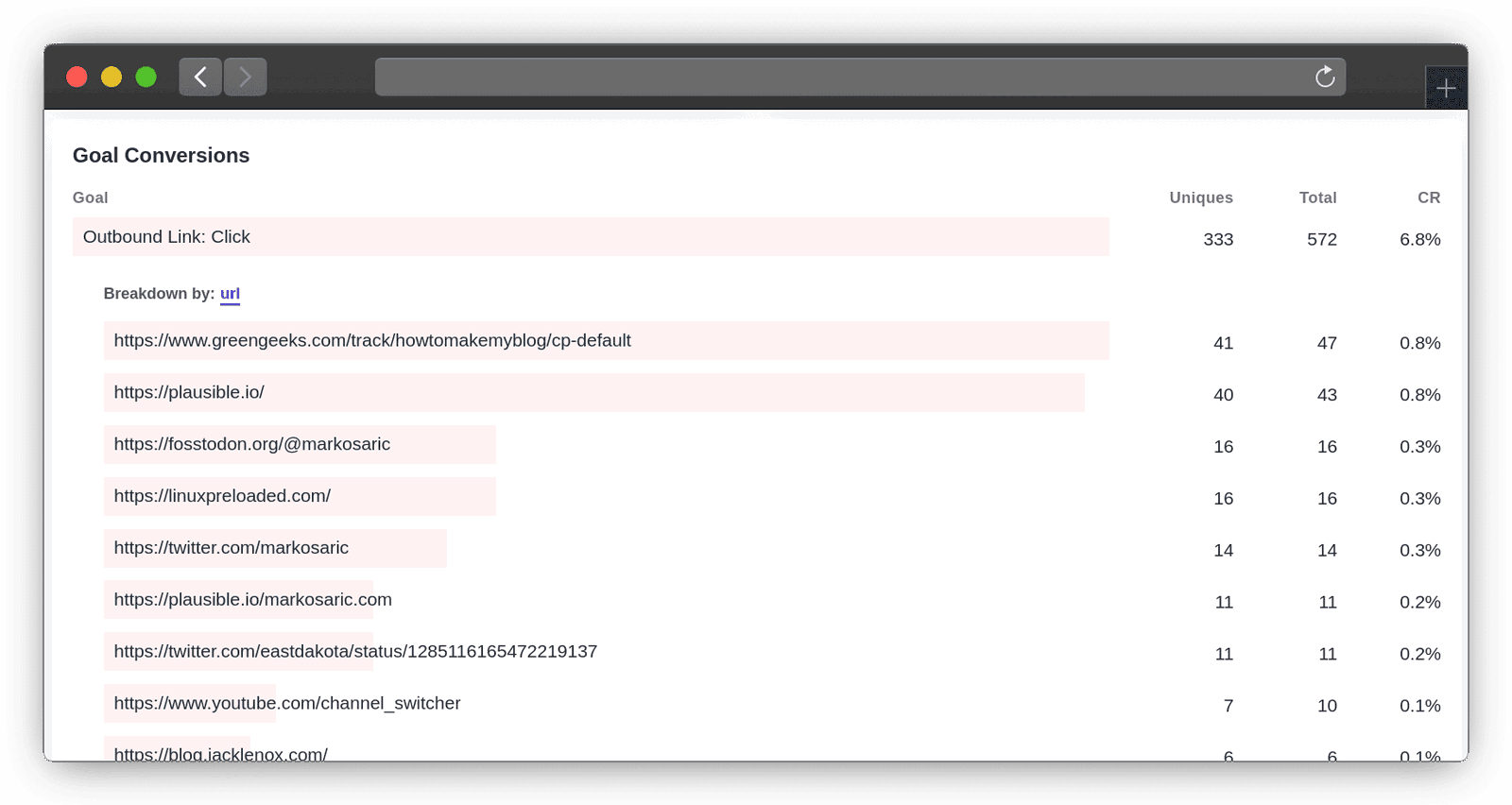
After you enable outbound link click tracking, we will automatically add a new goal called Outbound Link: Click to your site and all the external link clicks will start being tracked. They will be displayed in the “Goal Conversions” report at the bottom of your Plausible Analytics dashboard.
You’ll see the “Outbound Link: Click” goal as soon as the first external link click has been tracked. You can then see:
- The number of total external link clicks
- The number of unique external link clicks
- The conversion rate of different links
- Top referral sources that lead to clicks
- Top pages that drive the clicks
- Countries that click on external links
- Devices (screen size, browser, OS) that click on external links
And you can click on a particular external URL to filter your Plausible Analytics dashboard by those clicks only and get the full overview of the visitors that clicked on that specific URL. For all details, you can check out our documentation.
Enjoy!